Despatch Customer Order
This is relevant for:
|
Customer Pick Up
|
NO
|
|
Click and Collect
|
NO
|
|
Store Despatch
|
YES
|
- Once the Order is Finished Packing select F9 Payment to finalise the Packing of the Order.
- Freight or any products in Apparel21 marked as extra will be packed automatically.
- This launches the Packing Information screen. The Packing Information screen shown depends on the method of store despatch used i.e. Temando, Shippit or Manual despatch.
Despatch via Temando / Shippit
-
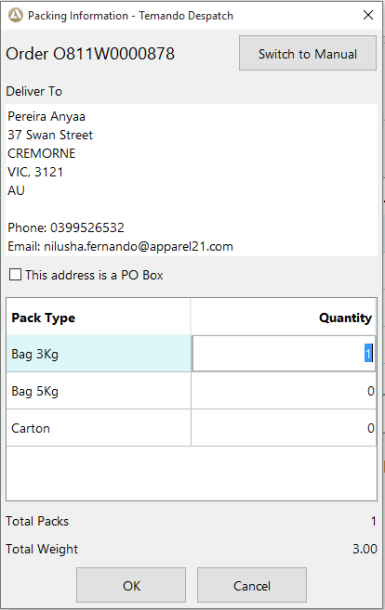
This launches the following Packing Information screen containing delivery information and pack types. Authority to Leave field is shown only if a value is available.
The Packing Information screen will display only if the correct freight despatch credentials have been set up at head office. If not set up properly, an error will be received and you will need to contact head office.
Note - If required, POS can skip 'Temando / Shippit' Despatch method and despatch using manual method by clicking on 'Switch to Manual' option. This will bring up the 'Manual' Despatch screen.
- Enter the Packing Information against the selected Pack Type and click OK.
-
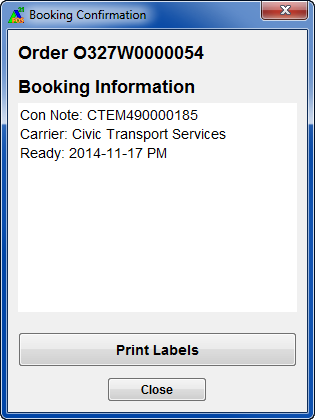
- POS communicates with Temando / Shippit to retrieve a shipment quote with the carrier and confirm the booking. This will return a consignment note number and delivery label. Select Print Labels option to print the Delivery labels.
For national Orders a 4X6 Delivery Label is returned
- Close the Booking Confirmation dialog
If required, labels can be reprinted by
Manual Despatch
1. This launches the following Packing Information screen containing delivery information.
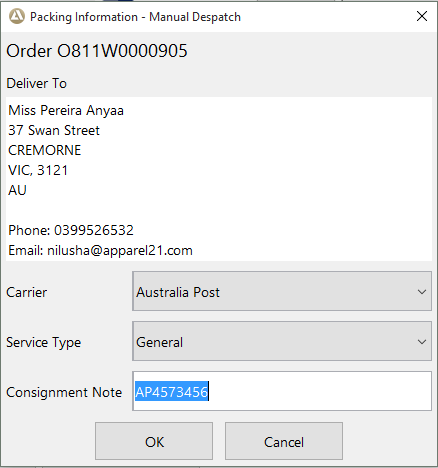
2. Select a Carrier, service type and in the Consignment Note number. Carrier and Consignment Note number fields are mandatory.
A maximum of 50 characters can be keyed as the Consignment Note.
3. Click OK.